




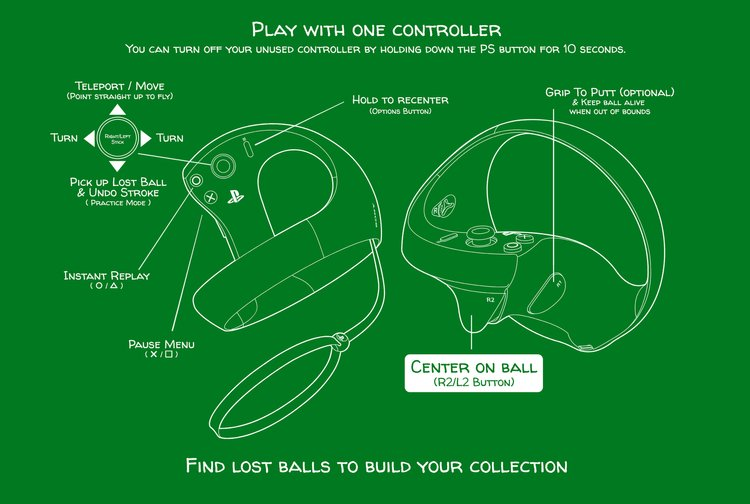
PSVR2 Controller Layout:
DLC Access Issues:
Try restoring your licenses for Walkabout if you encounter bugs around DLC ownership/access.
Navigate to your Settings, then select ‘Users/Accounts’, then ‘Other’. Select ‘Restore Licenses’.
Crossbuy:
There is no Crossbuy compatibility between a copy purchased from the PlayStation Store and any other platform.
Cross-Play:
For PSVR2 users, cross-play must be toggled ON at the Welcome Island Shack settings. If this is toggled OFF, you will be locked into Quick Match and Private Room games for your device platform exclusively.
Disable Crossplay:
Crossplay can be toggled off so that players are only paired with PSVR2 players in Quick Match.
Profanity Filtered Text:
Player Walkabout Display names and Private Match room names are filtered for profanity.
PS5 System Activities:
Quick Match & Private Match. PS5 activities set up to allow you to quickly jump to those areas from the dashboard and control center. Recently Played List: List displaying players you have recently played with in Quick Matches and Private Matches.
Blocked Player List:
In-game Block Player system and list displaying who you have blocked. NOTE: Blocking users will prevent you from being paired with them in Quick Matches. If you join a Private Match that includes a player you've blocked their Walkabout name will be set to "Blocked Player" and the system will Auto Mute them and prevent them from hearing you.
PSVR2 Support:

