
Save Data: Cloud Syncing, Troubleshooting Lost History
Last updated: Feb 23, 2026
If you’re encountering these issues, review these tips and tricks to help troubleshoot:
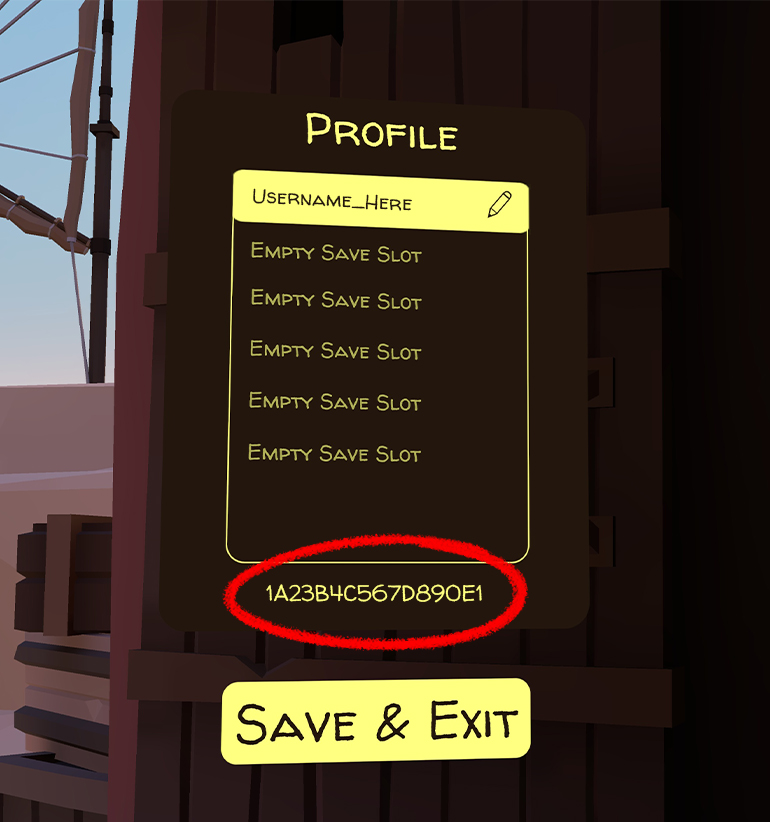
- Sometimes, upon a reinstall or multiple game updates in a row, a new in-game profile will be auto-generated at the Welcome Island Shack. This can give the impression that settings and scores have been wiped when you've been placed on a completely different profile than your primary listing. We recommend checking to ensure you are on the correct in-game profile by navigating to your ‘Profile’ tab at the Shack (clicking the Avatar icon listed on the upper left-hand display of the Shack).
- Try creating a new in-game profile and then toggle between that profile and the primary profile as a “refresh” to prompt the collectibles to populate.
- Quickly entering and exiting a course can sometimes cause a save sync to trigger, helping to load your data in.
- Give it some time. Sometimes it can take upwards of 10-15 minutes for assets/scores/etc. to load in, depending on the device and network, as well as updates (see the first bullet).
Still having issues with your data loss? Create a ticket here and be sure to include your profile ID.
To find your Profile ID, click on the Avatar image displayed on the upper right-hand display at the Shack; this will display your Profile panel with the Player ID listed at the bottom. Below is an image of where to find it.